2026 Photography Planner: Your Complete Business Organization Solution
Running a photography business means juggling multiple roles at once. You are the creative director, the sales team, the accountant, and the customer service representative all wrapped into one. Without a solid organizational system, important details slip through the cracks, deadlines get missed, and the joy of capturing meaningful moments gets buried under administrative chaos. This is where a purpose-built planning tool transforms your workflow and protects your sanity.
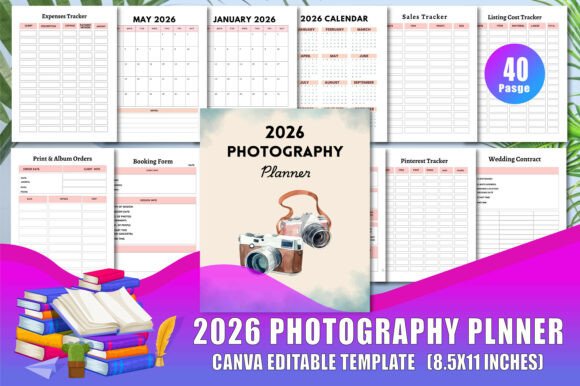
The 2026 Photography Planner is a comprehensive 40-page digital template designed specifically for photographers who want to keep their business running smoothly throughout the year. Rather than forcing your unique photography workflow into a generic planner, this solution gives you pages that actually match how you work. From tracking income and expenses to managing wedding contracts and photo release forms, every section serves a real purpose in your daily operations.
What Makes This Planner Different from Generic Options
Off-the-shelf planners rarely understand the specific needs of a photography business. You do not just need to track appointments. You need to manage booking deposits, track album orders, organize wedding checklists that span months, and keep up with social media marketing across multiple platforms. The 2026 Photography Planner addresses all of these areas with dedicated pages that save you from creating your own systems from scratch.
The visual design leans toward clean and professional without feeling cold or corporate. Soft layouts with ample white space make the pages inviting to use rather than overwhelming. The 8.5 x 11 inch size feels substantial on your desk but fits easily into most bags when you need to bring it to consultations or shoots. Every page prints at 300 DPI, which means crisp text and clear lines whether you print at home or use a professional print service.
Core Pages That Keep Your Business Organized
Let me walk through the specific sections that make this planner a genuine asset for any photographer. The Belongs to page might seem simple, but it protects your work when pages get separated during busy seasons. The Income Tracker and Expenses Tracker give you a clear picture of your financial health throughout the year rather than waiting until tax season to discover problems.
The Listing Cost Tracker is particularly valuable if you sell products like prints or albums. Knowing exactly what you pay for materials helps you set prices that protect your profit margins. The Sales Tracker and Receipt pages create a paper trail that simplifies bookkeeping significantly.
Legal protection matters in photography, and the included Photo Release Form and Booking Form pages give you professional documentation without needing to design these from scratch. The Wedding Contract section provides structured space for terms, signatures, and important dates. For photographers who shoot multiple weddings each season, the five-page Wedding Checklist is worth the price of the entire planner on its own. It breaks down the timeline from initial consultation through final delivery, so nothing gets forgotten in the chaos of back-to-back wedding weekends.
Managing Your Marketing and Social Media Presence
Marketing consistently is one of the biggest challenges photographers face. When you are busy shooting and editing, posting on social media often falls by the wayside. The YouTube Tracker, Pinterest Tracker, Facebook Tracker, and Instagram Tracker pages help you plan and review your content strategy across the platforms that matter most for visual businesses.
By dedicating space to each platform, you can track what posts perform well, which topics resonate with your audience, and where you should focus your energy. Over time, these pages become a record of what works for your specific niche, whether that is wedding photography, portrait sessions, or commercial work.
Client Communication and Session Management
The two-page Photo Session Agreement section provides professional documentation for every shoot you book. Clear agreements prevent misunderstandings and protect both you and your clients. The Reminders page helps you stay on top of follow-ups, proof delivery dates, and client communication without relying entirely on your memory or scattered sticky notes.
For photographers who specialize in weddings, the dedicated Wedding and Prenuptial pages keep these complex projects organized from start to finish. The Print Album Orders section is essential for anyone who sells physical products. Tracking album specifications, delivery dates, and client preferences in one place eliminates the back-and-forth emails that eat into your creative time.
Customizing the Planner for Your Specific Needs
One of the strongest features of this product is how easily you can adapt it. The editable Canva link means you can open every page in your browser and make changes immediately. You can adjust colors to match your brand palette, resize elements, add your logo, or remove pages that do not apply to your workflow. If you specialize in newborn photography rather than weddings, you can remove the wedding-specific pages and add your own sections without any design software beyond what Canva offers for free.
The files come in multiple formats including high-resolution JPG, PNG, and print-ready PDF. This flexibility means you can use the planner digitally on a tablet with annotation apps, print it at home, or send it to a professional printer for a polished bound notebook. The no-bleed design simplifies printing because you do not need to worry about content getting cut off at the edges.
Practical Tips for Getting the Most Out of Your Planner
Start by printing a single copy and using it for a month before making any customizations. This approach lets you see which pages you use daily and which ones you rarely touch. After that initial test period, open the Canva file and remove the pages that do not serve your workflow while adding duplicates of the ones you wish had more space.
Consider printing the financial trackers on heavier paper since they will see frequent use throughout the year. The wedding and event pages can be printed individually as needed rather than binding them all at once. This modular approach keeps your main planner from becoming bulky while still having specialized pages available when projects require them.
For photographers who work digitally, the JPG and PNG files work beautifully with apps like GoodNotes, Notability, or OneNote. Import the pages as images and write directly on them with your stylus. This method gives you the structure of a printed planner with the searchability and backup benefits of digital files.
Who Benefits Most from This Planning System
New photographers who are still building their business systems will appreciate having professional templates ready to use from day one. Instead of designing their own contracts and trackers, they can focus on developing their craft and serving clients well. Established photographers will find that the structured pages save time they currently spend maintaining custom spreadsheets or adapting generic planners to fit their needs.
Wedding photographers who manage complex timelines, multiple stakeholders, and high-stakes deliverables will find the specialized wedding pages invaluable. Portrait photographers will appreciate the session agreement and release form pages that simplify client communication. Product photographers who sell prints and albums will benefit from the cost tracking and order management sections.
The planner also works well for photographers who teach workshops or run second-shooter networks. The tracking pages can be adapted to manage team schedules, equipment inventory, or client referrals without much modification.
Building a Professional Brand Identity Through Organization
How you manage your business communicates as much about your brand as your photography style does. Walking into a client consultation with a clean, professional planner shows that you take your work seriously and respect their time. Following up with organized contracts and clear timelines builds trust before you even take the first photo.
The consistent formatting across all 40 pages reinforces your professionalism without requiring you to become a graphic designer. The editable Canva link means you can add your logo, choose brand colors, and create a cohesive look across every client-facing document. This attention to detail sets you apart from photographers who hand clients scribbled notes on random paper.
When you present a wedding couple with a clear checklist and timeline, they feel confident that their big day is in capable hands. When you send clients organized receipts and release forms, they appreciate the transparency and efficiency. These small touches add up to a reputation for reliability that leads to referrals and repeat business.
The 2026 Photography Planner gives you the structure to deliver that experience consistently throughout the year. Whether you are just starting your photography business or looking to refine your existing workflow, having dedicated space for every aspect of your operations frees your mental energy for what matters most: creating images that your clients will treasure for a lifetime.