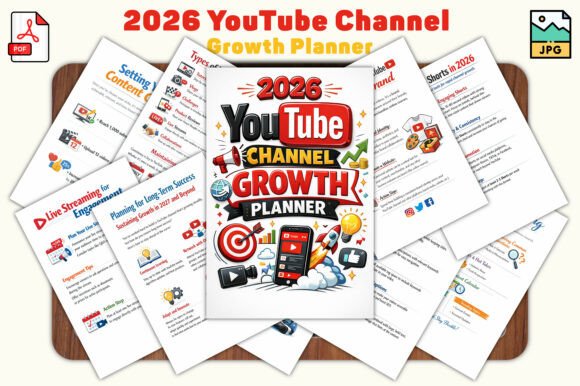
2026 YouTube Channel Growth Planner: Your Roadmap to Consistent, Sustainable Success
If you are serious about growing a YouTube channel in 2026, you already know that raw talent and good video ideas are only part of the equation. The difference between channels that thrive and those that stall often comes down to one thing: organization. The 2026 YouTube Channel Growth Planner is designed to fill that gap, but like any tool, its value depends entirely on how you use it.
Many creators download a planner, fill in a few pages, and then abandon it when real life gets busy. That is not a reflection of the planner itself—it is a sign that the approach needs correcting. This article walks through the most common mistakes creators make when using growth planners, why those mistakes hurt your progress, and how to use the 2026 YouTube Channel Growth Planner in a way that actually moves your channel forward.
Why a Structured Planner Matters More Than You Think
YouTube success rarely happens by accident. The creators who grow steadily treat their channel like a project. They set milestones, track performance, and adjust their strategies based on real data rather than hunches. A planner like this one—with 30 print-ready pages covering goal-setting, content planning, and progress tracking—gives you a framework to do exactly that.
What makes the 2026 edition particularly useful is that it accounts for the shifting landscape of YouTube. Algorithm changes, audience behavior patterns, and content trends evolve quickly. A planner built with 2026 in mind helps you stay ahead rather than playing catch-up. But to get those benefits, you need to avoid a few common pitfalls.
Mistake #1: Treating the Planner as a One-Time Activity
A frequent error is filling out the goal-setting pages at the start of the year and then never looking at them again. You might write down ambitious targets—10,000 subscribers, 100,000 views per month, a certain number of uploads—but without regular review, those goals become static wishes rather than active guides.
Why this hurts your channel: Without consistent check-ins, you lose the feedback loop that tells you what is working and what is not. You may keep producing content that misses the mark simply because you never paused to compare your current results against your original plan.
How to fix it: Use the weekly check-in pages built into the planner. Block out 15 minutes every Sunday to review what you published, how it performed, and whether you are on track for your monthly milestones. This small habit transforms the planner from a static document into a living tool.
Mistake #2: Copying Someone Else's Goals Without Context
Aspiring creators often look at successful channels in their niche and try to replicate their subscriber counts, upload frequency, or content style. This is especially tempting when you see a planner filled with impressive milestones set by another creator. But goals that work for one channel may be completely wrong for yours.
Why this is problematic: Your audience, resources, schedule, and skill level are unique. Setting goals based on someone else's journey sets you up for frustration when you do not hit those numbers on their timeline. It can also push you toward content that does not align with your brand or your audience's expectations.
A better approach: Use the goal-setting milestone pages in the 2026 YouTube Channel Growth Planner to define your own benchmarks. Start with where you are right now. If you currently have 500 subscribers, a realistic milestone for the next quarter might be 800, not 5,000. Base your targets on your own growth rate, upload consistency, and engagement metrics. You can always adjust upward as you gain traction.
Mistake #3: Ignoring the Content Planning Pages
The planner includes pages dedicated to organizing your video ideas, scheduling uploads, and mapping out content themes. A common oversight is to skip these sections entirely and focus only on the goal-trackers. Creators who do this often end up with ambitious targets but no clear path to reach them.
What happens instead: You wake up on a Monday with no idea what to film. You scramble for an idea, record something half-prepared, and upload it late. The video underperforms, and you feel discouraged. This cycle repeats because you never invested time in planning your content pipeline.
Practical advice: Dedicate one hour every two weeks to fill out the content planning pages. Brainstorm video topics, decide on formats (tutorials, vlogs, reviews, etc.), and assign a rough upload schedule. When you already know what your next five videos will be, you reduce decision fatigue and increase consistency. Consistency, more than any single viral video, is what builds a loyal audience.
Mistake #4: Overlooking the Progress Trackers
The 30 pages include progress trackers for metrics like views, watch time, subscriber growth, and engagement. Some creators skip these because they already check their YouTube Studio dashboard regularly. But dashboard data and structured tracking serve different purposes.
The difference: Your dashboard shows raw numbers. A progress tracker in a planner encourages you to reflect on what those numbers mean. You can note trends, correlate them with specific content choices, and spot patterns that raw data alone might hide. For example, you might notice that videos with a certain thumbnail style consistently get higher click-through rates, or that your audience retention drops at the same point in every video.
How to use it effectively: At the end of each month, transfer key metrics from YouTube Studio into the planner's tracker pages. Then add a short note: what worked, what did not, and what you will try next month. Over time, this builds a personal knowledge base that no generic advice can replace.
Mistake #5: Assuming the Planner Works Without Consistent Effort
No tool, however well-designed, can replace the work of creating and improving content. The 2026 YouTube Channel Growth Planner is a roadmap, not a magic solution. Some creators download it, print it out, and expect that the act of writing down goals will somehow make them happen.
Why this is a trap: Writing a goal is the first step, but the next two dozen steps involve filming, editing, optimizing, and promoting your videos. If you treat the planner as a substitute for action, you will feel productive without actually making progress.
The right mindset: Use the planner to clarify your priorities and remove guesswork from your routine. Then put the planner away and do the work. Come back to it during your weekly review to assess and adjust. The planner is most powerful when it sits alongside your creative process, not in place of it.
What to Check Before You Download or Buy
If you are considering the 2026 YouTube Channel Growth Planner, there are a few practical details worth confirming first so you get the most out of it.
- File format compatibility: The planner is available as PDF and JPG files. Make sure your device or preferred note-taking app supports these formats. If you plan to use it digitally, check whether your app allows annotation on JPGs or if PDFs are more practical for your workflow.
- Print quality: The 6×9 inch vertical format is compact and easy to bind or place in a binder. If you prefer a larger working area, you may want to print at a slightly larger scale or use a magnifying option. Test a single page first to confirm the print quality meets your standards.
- Your actual needs: Browse through the full list of included pages—goal-setting milestones, progress trackers, weekly check-ins, content planners. Ask yourself honestly whether you will use most of them. A planner is only valuable if it matches the way you work. If you already have a strong system for some of these areas, you might only need to supplement, not replace.
Practical Examples of Better Use
Let me give you two realistic scenarios that illustrate the difference between common mistakes and a more effective approach.
Scenario A – The rushed downloader: Marco downloads the planner, prints all 30 pages, and fills out the goal-setting page with "Get 10,000 subscribers by June." He skips the content planning section because he wants to film spontaneously. By March, he has gained 400 subscribers, feels demoralized, and stops using the planner. He blames the tool, but the real issue was a lack of structured execution.
Scenario B – The thoughtful user: Priya downloads the same planner. She starts by setting a realistic three-month goal: "Grow from 1,200 to 2,000 subscribers by improving video quality and posting weekly." She uses the content planning pages to map out 12 videos around a theme her audience loves—beginner photography tips. Every Sunday, she reviews her progress tracker and notes which thumbnails got the highest click-through rate. By month three, she has 2,100 subscribers and a clear sense of what works for her channel. She adjusts her next quarter's goals upward with confidence.
The difference is not the planner. It is how Priya integrated the planner into a consistent, reflective workflow.
Why This Planner Works for Different Creators
Whether you are a beginner trying to publish your first consistent batch of videos or an experienced creator looking to professionalize your workflow, the 2026 YouTube Channel Growth Planner adapts to your level. Beginners benefit from the structure that removes guesswork. Experienced creators can use the tracking pages to refine strategies that are already working.
Entrepreneurs and small business owners who use YouTube for marketing will find the goal-setting milestones particularly useful for tying content output to business objectives. Freelancers and educators can use the planner to balance paid work with consistent publishing. The common thread is that anyone who takes the time to use the planner methodically will see more predictable progress than someone who relies on improvisation alone.
Final Thoughts on Making the Planner Work for You
The 2026 YouTube Channel Growth Planner is a genuinely useful resource when approached with the right expectations. It gives you a clear structure for goal-setting, content planning, and performance tracking—all critical for sustainable growth. But it works best when you treat it as a partner to your creative effort, not a replacement for it.
Set realistic milestones. Use the content planning pages to build a consistent pipeline. Review your progress weekly and adjust based on what the data tells you. Avoid the trap of copying someone else's targets or treating the planner as a one-time activity. When you do these things consistently, the planner becomes a powerful tool that helps you turn your YouTube ambitions into measurable, achievable results.
Download it, print it, and start using it today—but more importantly, commit to using it the right way, week after week. That is what separates creators who grow from those who just stay busy.