How to Get the Most From Your Ultimate Health Planner KDP Interior Without Wasting Time or Money
You’ve come across the Ultimate Health Planner KDP Interior—maybe you’re a content creator looking for a ready-made product to sell, or perhaps you want a personal wellness system that actually works. Either way, you’re probably hoping this planner will bring some order to your health routine. And it can. But only if you avoid a few common traps that people stumble into when using pre-designed templates or printed planners for the first time.
Let’s walk through what this planner actually includes, where people tend to go wrong, and how you can use it the right way from day one.
Understand What You’re Really Getting
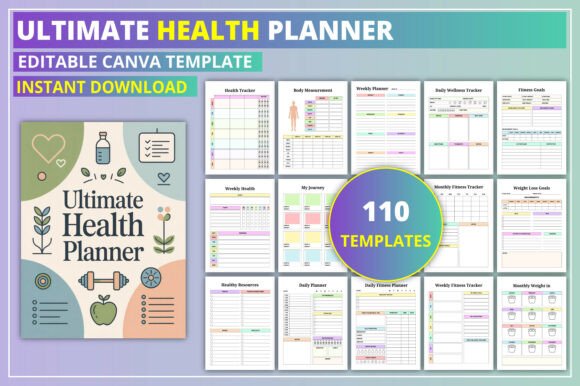
The Ultimate Health Planner KDP Interior is a 110-page template designed to track physical health, mental wellness, nutrition, and goal progress. It includes pages like a health tracker, nutrition references, anxiety and stress logs, weekly overviews, and even a 30-day challenge. The file is fully customizable in Canva, so you can change fonts, colors, and layouts to match your brand or personal style.
That sounds great on paper. But the mistake many people make is treating it as a “one size fits all” solution without understanding what each page is for and whether it actually fits their needs.
What the Planner Does Well
It covers a broad range of wellness categories. If you’re someone who wants to track nutrition, supplements, body measurements, mental health symptoms, and weekly habits in one place, this gives you that structure. The clean aesthetic is appealing, and the ability to customize in Canva makes it flexible for KDP publishers who want to differentiate their product.
But broad doesn’t always mean complete. You still need to think critically about what you’ll actually use and what might end up as wasted space.
Common Mistake #1: Using Every Page Without Question
A lot of people open a planner like this and feel obligated to use every single page. They print the whole thing, fill in the “Belongs To” page, then get overwhelmed by the anxiety log, depression tracker, and stress tracker all at once. Within two weeks, the planner sits untouched on a shelf.
What happens: You burn out because you’re trying to track too many things at once. The planner becomes a chore instead of a tool.
Better approach: Pick three to five pages that match your current priorities. If your focus is nutrition and body goals right now, use the nutrition tracker, weekly health overview, and measurement tracker. Leave the anxiety and worry worksheets for later if they aren’t relevant today. You can always add them in when your needs change.
Common Mistake #2: Ignoring the Customization Options
The Ultimate Health Planner KDP Interior is designed to be customized. But many users—especially those selling on KDP—treat it as a static product. They change the cover, maybe tweak a color, and call it done. That’s a missed opportunity.
If you’re a creator, your audience has specific problems. A generic planner with no personalization blends into the sea of similar products. If you’re using it for yourself, a generic layout might not match how your brain naturally tracks progress.
What happens: You get a product that feels like it belongs to someone else. Engagement drops. Sales don’t stick. Personal use fades after a week.
Better approach: Spend time in Canva adjusting the planner to your actual workflow. Change section headings to match your language. Add or remove pages if your audience needs something different. If you’re selling, consider niche versions—one for postpartum moms, one for busy professionals, one for weight loss journeys. The structure is there; you just need to tailor it.
Common Mistake #3: Not Testing the Tracker Rhythm Before Committing
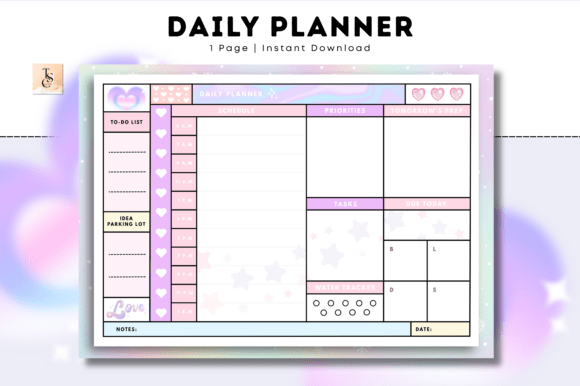
Planners look good in previews. But a daily tracker might not work for someone who only wants weekly check-ins. The “Daily Planner” page in this interior is a single page, not a full daily spread. That’s fine if you use it selectively, but some people assume it’s a full daily log and then feel disappointed.
What happens: Expectations don’t match reality. You either abandon the planner or force a daily routine that doesn’t fit your life.
Better approach: Before you print or publish, simulate a week. Staple together a sample set of pages—the weekly overview, health tracker, and one or two others. Use them for seven days. See if the tracking frequency makes sense. If you find yourself skipping pages, modify the layout before you finalize. For KDP creators, test your own product as if you were the customer. You’ll catch usability issues before your buyers do.
Common Mistake #4: Overlooking the Mental Health Pages Until You Need Them
This planner includes an anxiety log, depression tracker, stress tracker, worry worksheet, and therapy notes pages. People routinely skip these or think “I don’t need that.” Then a stressful month hits, and they scramble for a tool that could have been ready.
Mental health tracking isn’t just for people with diagnosed conditions. It’s useful for anyone who wants to notice patterns in their mood, sleep, or triggers. Ignoring these pages means you miss out on one of the most valuable parts of this interior.
What happens: You treat the planner like a fitness-only tool. Over time, you realize that your nutrition and exercise dips are tied to stress or anxiety, but you have no data to confirm it.
Better approach: Even if you don’t fill out the worry worksheet daily, keep it in your planner. Use the stress tracker once a week as a quick check-in. You’ll start to see connections between your mental state and your physical results. That insight is where real progress happens.
What to Check Before Buying or Using This Interior
Whether you’re a KDP publisher or a personal user, take a few minutes to verify these things before you commit time or money.
- Page count and format: This interior has 110 pages. Make sure your printing or publishing platform handles that number well. For KDP, check trim size and bleed requirements so your interior matches your cover.
- Canva accessibility: The template is Canva-based. If you’re not comfortable with Canva’s editing tools, you’ll need to learn the basics before you can customize effectively. That includes changing fonts, moving elements, and exporting correctly.
- Tracker frequency: Look at how often each tracker expects you to log. The weekly health overview is manageable. The daily planner page is one page—understand what “daily” means in this context so you’re not expecting a multi-page daily journal.
- Niche fit: If you’re selling, ask yourself who specifically needs this. General health planners work, but planners tailored to a specific audience—like postpartum recovery, stress management for corporate workers, or fitness tracking for runners—often perform better because they solve a specific problem.
Practical Advice for Getting the Most Value
Start small. Print only the pages you’ll use for the first month. Add more as you build the habit of tracking. If you’re creating a product for KDP, consider offering a sample pack—just the “Health Tracker,” “Weekly Overview,” and “Measurement Tracker” pages—so potential buyers can test the format before buying the full 110-page version.
Use the “My Health Goals” page as a quarterly reset, not a yearly one. Goals change faster than most people expect. Revisiting them every three months keeps your planner relevant and your motivation steady.
For the “Nutrition References” page, don’t treat it as static. Update it as you learn new things about your dietary needs. A reference page that grows with you is far more useful than one you fill out once and forget.
The “30 Day Challenge” page is one of the most underused features. People set a single challenge and move on. Instead, run multiple 30-day challenges throughout the year, each focused on a different area—hydration, sleep, sugar reduction, daily movement. Use the planner’s other trackers to measure what changes during each challenge.
How This Avoids the Common Pitfalls of Pre-Made Planners
A lot of pre-designed interiors feel generic because they try to serve everyone. The Ultimate Health Planner KDP Interior avoids that by giving you a structure that is broad enough to adapt but specific enough to feel intentional. The mental health pages are not an afterthought—they’re integrated in a way that suggests the designer understands wellness is not just about diet and exercise.
That said, no template can do the work for you. The value comes from how you use it. If you treat it as a static document, you’ll get static results. If you treat it as a starting point—editing, testing, and iterating—you’ll end up with a system that actually supports your health goals or your customers’ needs.
Whether you are publishing this interior on KDP or printing it for your own journey, take the time to make it yours. Customize the colors. Remove pages that don’t serve you. Add a habit tracker if that’s what you need. The best planner is not the one with the most pages. It’s the one you actually use.