2027 Celestial Planner: Your Yearly Companion
Planning your year ahead can feel like a balancing act. Between work deadlines, personal goals, travel plans, and daily routines, it’s easy to lose track. The 2027 Celestial Planner offers a structured yet flexible solution that adapts to your lifestyle. Whether you’re printing it for yourself or selling it on Amazon KDP, this editable Canva interior gives you full control over layout, colors, and text.
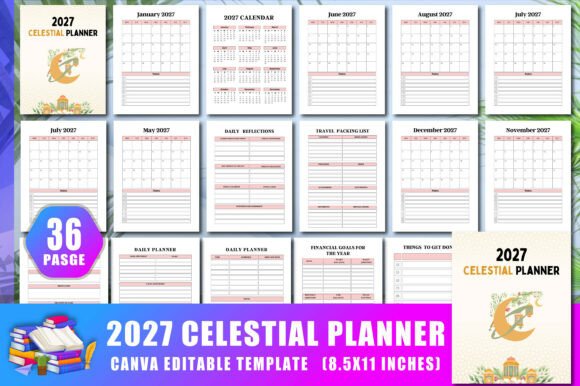
The planner includes 36 pages with no bleed, 300 DPI resolution, and a practical 8.5 x 11 inch size. You receive high-quality print PDF files along with JPG and PNG versions, plus a Canva link to edit everything. Let’s explore how different people can use it to stay organized and creative.
What Does the 2027 Celestial Planner Include?
This planner covers the essentials from monthly calendars to daily reflection prompts. Here’s a quick overview of the pages you’ll find inside:
- Belongs To page (personalization)
- 2027 Calendar overview
- Monthly spreads from January to December 2027
- Travel packing list and travel planner
- Vision board page
- Weekly and monthly budget trackers
- Financial goals for the year
- Daily reflections and daily planner (two versions)
- Weekly planner (two versions)
- Yearly, monthly, and weekly goal pages
- Things to get done
- Grocery shopping lists (two pages)
- To-do list, ideas page, and notes
- Thank you page
Each section is designed to help you break down big ambitions into manageable steps. The celestial-themed design adds a touch of inspiration without overwhelming the layout.
Why Different Audiences Find Value in This Planner
The 2027 Celestial Planner isn’t a one-size-fits-all template. Beginners may appreciate the ready-to-upload PDFs for KDP, while experienced creators can tweak the Canva link to match their brand. Professionals may focus on the budgeting and goal sections, whereas hobbyists might enjoy the vision board and travel pages. Let’s look at some specific examples.
For Beginners and First-Time Planners
If you’ve never used a printed planner before, starting with a structured format helps build the habit. The monthly calendar gives you a bird’s-eye view, while the daily planner lets you jot down tasks without pressure. Because you can edit the Canva version, you can remove sections you don’t need or add personal touches like stickers. The no-bleed design means even if you use a home printer, the pages come out clean.
Beginners often worry about commitment. With 36 pages, this planner covers a full year but remains lightweight. You can print only the months you need or photocopy specific pages for reuse. This flexibility reduces the risk of abandoning the planner mid-year.
For Creators, Designers, and Canva Users
If you work with Canva regularly, the editable link is a game-changer. You can change the color palette, swap fonts, add your own celestial artwork, or adjust the layout for different paper sizes. The included JPG and PNG files allow quick previews without opening the full project. For those selling on KDP, the ready-to-upload PDF saves hours of formatting. The 300 DPI ensures sharp prints, even for detailed illustrations.
Designers can also use this interior as a base for creating themed planners – perhaps a starry night version or a minimalist zodiac edition. The structure is solid, so you only need to customize the visuals. This commercial value is especially appealing for small business owners looking to expand their product line.
For Professionals and Entrepreneurs
Managing a business alongside personal life requires clear systems. The 2027 Celestial Planner includes weekly and monthly budgets, financial goals, and a yearly goals page. You can track cash flow, set revenue targets, and review progress quarterly. The weekly planner with two versions lets you separate work tasks from personal errands if desired.
Entrepreneurs often need to balance long-term vision with daily execution. The vision board page helps you map out big ideas, while the “things to get done” list handles immediate action items. Because the planner is editable, you can duplicate the budget pages for multiple projects or clients.
For Educators, Bloggers, and Content Creators
Educators can use the planner to outline lesson plans, track deadlines, and schedule parent meetings. The monthly calendar is great for long-term curriculum mapping, while daily reflections help with teaching journals. Bloggers and content creators will appreciate the ideas and notes pages for brainstorming posts, plus the to-do list to stay on top of publishing schedules.
The travel packing list and travel planner are bonus sections for educators who lead trips or attend conferences. You can customize these pages to include checklists for equipment, handouts, or promotional materials.
Key Factors to Consider Before Using the Planner
Different users prioritize different aspects. Here’s how you might evaluate the 2027 Celestial Planner based on your needs:
Ease of Use
Beginners should find the layout intuitive. The sections follow a logical flow from yearly overview to daily planning. If you prefer extreme minimalism, you can remove some pages in Canva. The no-bleed format means no trimming needed after printing.
Cost and Commercial Value
For KDP sellers, this interior saves the cost of hiring a designer. One purchase gives you both print-ready PDFs and editable files. You can upload directly to Amazon without additional formatting. The 8.5 x 11 inch size is standard for most printers, keeping production costs low.
Quality and Reliability
300 DPI ensures crisp text and images. The PDF is tested for print accuracy, and the Canva link retains all original elements. If you accidentally delete something, you can always revert to the original. The high-resolution JPG and PNG files work well for digital planners too.
Flexibility and Customization
You can add, remove, or rearrange pages using Canva’s drag-and-drop interface. Change colors to match your brand or season – celestial themes pair well with navy, gold, silver, or pastels. The “Belongs To” and “Thank You” pages are ready to personalize for clients.
Long-Term Usefulness
Although designed for 2027, many sections like the budget tracker, vision board, and to-do lists are reusable year after year. You can duplicate the file and update the dates for future planners. The goal pages don’t rely on specific dates, so they remain relevant as you develop new habits.
Does the 2027 Celestial Planner Match Your Goals?
This planner works best if you want a balance between structure and creativity. If you prefer a fully pre-filled planner with no editing, the print-ready PDF still gives you a complete product. If you love customizing every corner, the Canva link opens unlimited possibilities. The 36-page count is enough to cover essential planning without being bulky.
Beginners might start by printing the monthly calendars and one daily planner page to test it. Experienced users can jump straight to the budget or goal sections. Creators should explore the Canva link to see how easily the celestial theme can be adapted to different niches – think astrology, space, or nighttime aesthetics.
For those concerned about file format, the package includes multiple file types. The PDF is ready for Amazon KDP upload – just set your pricing and description. The JPG and PNG files are useful for mockups or digital previews. No bleed means you don’t have to worry about content getting cut off during printing.
Final Thoughts
Planning your 2027 doesn’t have to be stressful. The 2027 Celestial Planner offers a practical foundation that can be as simple or as detailed as you need. Whether you’re using it to organize your finances, map out creative projects, or build a side business on KDP, the structure and customization options support your personal workflow.
Take a few minutes to open the Canva link and browse through the pages. See which sections resonate with your current priorities. You can always adjust later. The key is to start somewhere – and this planner gives you a clear starting point for a productive and inspired year.