Why Most Blank Food Recipe Journals Fail (and How to Pick the Right One)
There is something quietly satisfying about flipping through a notebook filled with your own handwriting, especially when that notebook holds recipes you have tested, tweaked, and perfected over the years. A Blank Food Recipe Journal offers exactly that kind of personal archive, yet many people end up with a product that feels frustratingly incomplete, poorly formatted, or simply unusable for their actual cooking habits. The issue is rarely a lack of interest. It is almost always a mismatch between expectations and the specific features of the journal or interior file you choose.
Whether you are a home cook looking to preserve family dishes, a small business owner creating a branded cookbook, or an entrepreneur selling KDP interiors, understanding what makes a blank recipe journal truly functional can save you time, money, and a fair amount of kitchen frustration. Let's walk through the common pitfalls and, more importantly, how to avoid them.
Mistake Number One: Overlooking the Layout and Space Constraints
The most frequent complaint I hear about blank recipe journals is that the fields are too small or rigid. A standard layout might include a tiny box labeled "Ingredients" and a cramped section for "Directions." If you have ever tried to cram a detailed four-step sauce recipe into a space the size of a post-it note, you know exactly what I mean.
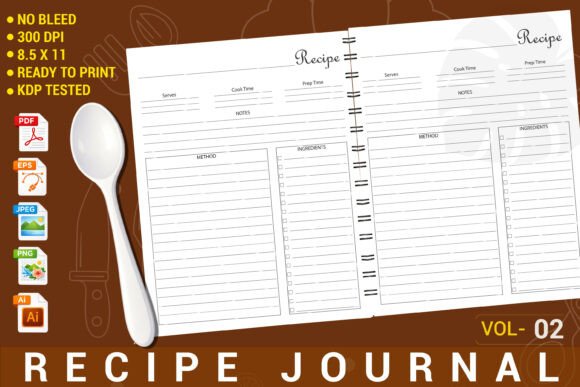
Many people assume that any blank recipe book will work for all types of cooking. In reality, a layout that works for a three-ingredient smoothie will frustrate you when you try to write down a complex lasagna or a multi-step baking formula. The Blank Food Recipe Journal described here uses a full 8.5 x 11 inch page, which gives you generous room for ingredients, instructions, and even personal notes. That extra space matters more than you might think, especially when you are jotting down adjustments mid-recipe or writing notes for next time.
What to check before you buy: Look at the ingredient field length and the direction area size. If you see a single narrow column for instructions on a standard page, ask yourself whether you can realistically write an entire recipe there. A well-designed interior gives you breathing room.
Mistake Number Two: Ignoring File Format Flexibility
This error is especially common among KDP sellers and content creators. You find a beautiful blank recipe journal interior, download it, and then realize you cannot edit the file because it is locked or only available in one format. Suddenly, you are stuck with a design that does not quite match your brand or your audience's needs.
The interior we are discussing includes five different file formats: PDF, PNG, JPEG, AI, and EPS. That variety is not just a nice bonus—it is a practical necessity. A PDF is perfect for a quick print or upload to KDP, but an editable AI or EPS file lets you adjust colors, move text fields, or add your own branding elements. If you are a small business owner or a freelancer creating custom cookbooks, being able to open and modify the original file saves hours of work.
Better approach: Before committing to any blank recipe journal interior, confirm what editable formats are included. If the product only offers a flattened PDF or a single image file, you lose the ability to tailor the layout to your specific project. The more formats you have access to, the more control you retain.
Mistake Number Three: Assuming "No Bleed" Means "No Worries"
Bleed settings can sound like a technical detail that only professional printers care about, but they directly affect how your finished book looks. The Blank Food Recipe Journal we are discussing uses a "No Bleed" setting, which means the content stays within safe margins and does not extend to the very edge of the page. For a KDP interior, this is actually a smart choice for many users.
Why? Because if you are printing through Amazon KDP, a no-bleed file reduces the chance of trimming errors that can cut off text or images near the edge. It also simplifies the upload process because you do not need to worry about extending backgrounds or design elements beyond the trim line. However, some people mistakenly think that no-bleed files look less professional. That is not true. A clean no-bleed layout with consistent white margins can look crisp, modern, and very readable.
The real mistake is failing to match the bleed setting to your intended use. If you plan to print at home or use a local print shop that requires full bleed, a no-bleed file might leave white borders you do not want. But for standard KDP paperback interiors, no-bleed is often the safer, cleaner option.
Mistake Number Four: Overlooking the "One Unique Page" Reality
This interior features "1 unique page." Some buyers see that and worry the book will be repetitive or boring. In practice, a single well-designed page template repeated throughout the journal creates consistency and makes the book feel cohesive. The question is not whether the page is unique, but whether that unique page actually serves your recipe-writing needs.
Many journals fail because they include too many different page layouts trying to be clever, but none of them work well for a full recipe. You end up with a spread that has a decorative border but no room for prep time or serving size, or a page that looks beautiful but forces you to abbreviate ingredient lists. The better approach is to find a single layout that covers all the essential fields: recipe name, prep time, cook time, servings, ingredients, directions, and maybe a notes section. If that one page does those things well, you will not miss having twelve different designs.
Practical check: List the information you typically include when you write a recipe. Then compare that list to the fields available in the journal. If the layout covers your essentials without wasted space, it is a good fit regardless of how many unique pages it has.
Mistake Number Five: Forgetting That "Editable" Is Not Always Obvious
The product description says it is "100% editable," and that is a huge advantage—but only if you have the right software to open the files. An AI file requires Adobe Illustrator or a compatible alternative. An EPS file may need a vector graphics editor. If you open a PNG or JPEG expecting to move text fields around, you will be disappointed because those are raster images.
This is where a common misunderstanding trips people up. They see "editable" and assume they can open the file in any program and start typing. In reality, editable means the source files are provided in formats that allow modification, but you need the appropriate tools. If you are a beginner without access to design software, the PDF version might be your best bet for printing directly, while the PNG and JPEG files are useful for quick previews or social media mockups.
Solution: Before purchasing, take inventory of the software you already have. If you own a vector editing program, the AI and EPS files are gold. If you work mainly with free tools like Canva or GIMP, check whether those programs can open the formats provided. Knowing your workflow prevents the frustration of downloading a file you cannot use.
Mistake Number Six: Underestimating the "ZIP File" Step
It sounds trivial, but many buyers struggle with ZIP files. The product includes multiple formats, and those are typically delivered inside a compressed ZIP folder. If you are not familiar with opening ZIP files on your computer or phone, you might think the download is broken or missing files. This is especially common among users who rely on mobile devices for file management.
Most modern operating systems can open ZIP files natively—just double-click or tap to extract the contents. But if you are using an older device or a restrictive mobile app, you may need a free extraction tool. The key is to know this ahead of time so you are not caught off guard. The product description explicitly mentions this, but it is easy to overlook when you are excited about the design.
Better habit: When you download a ZIP file, save it to a folder you can find later, then extract everything before trying to open individual files. Name the folder clearly so you do not lose track of which interior belongs to which project.
Mistake Number Seven: Treating a Recipe Journal Like a One-Time Project
The Blank Food Recipe Journal is often purchased as a single item for personal use, but it can be much more versatile than that. If you are a blogger, educator, or entrepreneur, you can use the same interior design to create multiple books: a baking journal, a family recipe collection, a healthy meals log, or even a client gift. Because the interior is editable and comes in multiple formats, you can customize it for different audiences without starting from scratch each time.
I have seen people buy a single journal interior, fill it in once, and then assume they have to buy a completely different design for their next project. That is an unnecessary expense. If the layout is generic enough to cover most recipes, you can reuse the same template with different covers and different titles. This is especially useful for KDP sellers who want to build a series of cookbooks with a consistent look.
What to do instead: When you evaluate a blank recipe journal interior, think about how many times you could use it. Can you change the title? Can you swap out a background color? Can you add a logo? If the file is as editable as promised, one purchase can serve many projects.
Mistake Number Eight: Ignoring the "Instant Download" Limitation
The product is an instant digital download. No physical item will be sent. That is great for speed and convenience, but it also means you are responsible for printing or uploading the file correctly. Some people buy a digital interior, download it, and then realize they do not have a reliable printer or they are unsure how to upload it to KDP.
If you are creating a physical cookbook for yourself, you need to consider print quality, paper type, and binding. If you are selling on KDP, you need to follow Amazon's formatting guidelines, which include margins, trim size, and file resolution. The interior we are discussing is "KDP tested," which means it has been checked against Amazon's requirements. That saves you the headache of a rejected upload, but you still need to know how to create a proper PDF with the correct settings.
Advice: Before you buy any digital journal interior, confirm that you are comfortable with the printing or publishing process. If you are new to KDP, look for tutorials on how to upload a no-bleed interior. If you are printing at home, test a single page first to make sure the layout matches your paper size.
The Smarter Way to Use a Blank Food Recipe Journal
Now that we have covered the most common mistakes, let's talk about what getting it right looks like in practice. When you choose a Blank Food Recipe Journal with a thoughtful layout, multiple editable formats, and a KDP-tested no-bleed design, you are setting yourself up for a much smoother experience. You can write your recipes without fighting the page, you can customize the interior for different projects, and you can upload it to Amazon with confidence.
One practical example: Say you are a freelance recipe developer who needs to keep a personal archive of tested recipes. You purchase this interior, open the AI file, and add your own header with your branding. You print a few copies for your kitchen and also upload a version to KDP as a supplementary workbook for your clients. The same file serves two completely different purposes because you took the time to choose a flexible, editable product.
Another example: A small bakery owner wants to create a branded recipe book as a gift for loyalty program members. Instead of hiring a designer to create a custom layout from scratch, they buy this interior, adjust the colors to match their brand, and add their logo to the page. A few hours of work produces a professional-looking book that would have cost hundreds of dollars in design fees.
Final Checks Before You Download
Before you make your purchase, take five minutes to confirm a few key details. First, verify that the page size (8.5 x 11 inches) works for your intended use. If you plan to print at home, measure your paper tray. If you are uploading to KDP, check that your chosen trim size matches. Second, review the file formats listed and make sure you can open at least one of them with your current software. Third, read the description carefully for any notes about ZIP files or instant download procedures. Fourth, consider whether you will use the editable files for a single project or multiple projects—this affects the overall value.
When you approach a Blank Food Recipe Journal with clear expectations and a practical workflow, the result is a tool that genuinely supports your cooking, your creativity, or your business. The difference between a frustrating experience and a rewarding one often comes down to the small details you check before you click purchase.
Take your time, look at the layout, think about your own recipe-writing habits, and choose an interior that gives you room to write freely. That is the whole point of a blank journal in the first place.