Baby Bump Journal Canva KDP Graphic: A Practical Tool for Pregnancy Memory Keeping and Low Content Publishing
Pregnancy is a period of rapid change, deep emotion, and countless details that are easy to forget in the blur of sleepless nights and diaper changes. A structured way to capture those moments is not just sentimental—it is practical. The Baby Bump Journal Canva KDP Graphic offers a fully editable Canva template that serves two distinct audiences: expecting parents who want a polished memory book, and content creators who need a ready-to-publish product for platforms like Amazon KDP, Creative Fabrica, or Etsy.
This article walks through what this template actually includes, how it fits into real workflows for both personal use and commercial publishing, and how to get the most out of it whether you are documenting your own pregnancy or building a product line.
What the Baby Bump Journal Canva KDP Graphic Actually Contains
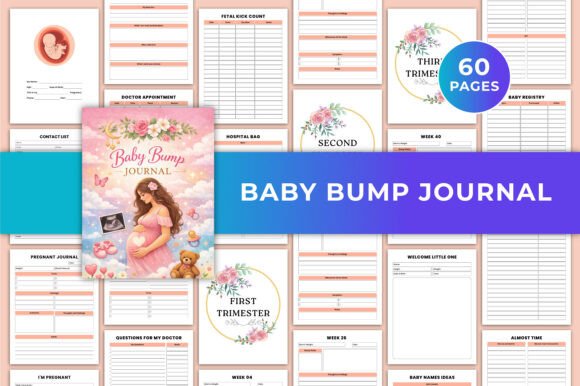
Before integrating any template into a workflow, it helps to know exactly what you are working with. This particular baby bump journal is a 63-page printable PDF template designed in US Letter size (8.5 × 11 inches) with no bleed, CMYK color, and a clean, minimal layout. It comes with high-quality JPG and PNG files alongside the editable Canva template.
The structure is built around full pregnancy tracking across 40 weeks, organized into trimesters. It includes pages for health and medical monitoring, emotional reflection and memory keeping, baby planning and budgeting, and dedicated space for doctor visit notes. The design is print-ready, which means it requires minimal additional formatting before publishing or printing.
For KDP low content publishers, the no-bleed specification and CMYK color profile are significant. These details directly affect how the interior will appear on Amazon's previewer and in print. For personal users, the same specs mean you can print at home or at a local shop without unexpected cropping or color shifts.
Using the Template Before, During, and After Pregnancy
A common mistake with pregnancy journals is starting too late or using them inconsistently. The Baby Bump Journal Canva KDP Graphic is structured so that you can begin using it from the day you find out you are pregnant. The early pages accommodate the initial emotions, the first doctor confirmation, and the earliest milestone tracking.
During the pregnancy, the weekly tracking pages let you log physical changes, symptoms, and baby development notes in real time. The trimester sections break the journey into manageable chunks, making it easier to stay consistent. You do not need to fill every page at once—you can work through it as the weeks progress.
After the baby arrives, the journal becomes a complete record. The memory-keeping pages and reflection prompts allow you to look back and fill in details you may have skipped during the busier weeks. This makes it useful as a keepsake long after birth, not just a task to complete during pregnancy.
How Creators and Sellers Integrate This Template into Their Workflow
For anyone selling digital products on Amazon KDP, Etsy, Creative Fabrica, or similar platforms, the Baby Bump Journal Canva KDP Graphic eliminates a significant amount of design work. Instead of building a 63-page interior from scratch, you start with a fully structured layout that already follows KDP formatting requirements.
The typical workflow for a KDP seller looks like this:
- Open the Canva template and review the existing pages to understand the structure.
- Customize fonts, colors, and layout elements to match your brand or target audience.
- Export the interior as a print-ready PDF with CMYK color and no bleed settings.
- Upload the PDF to Amazon KDP alongside a separate cover file.
- Set up the book description, keywords, and pricing before publishing.
Because the template is fully editable, you can also create multiple variations. For example, you can change the color palette to create a neutral version, a pink-toned version, and a blue-toned version, then publish each as a separate listing. This expands your catalog without requiring new design work each time.
For printable shop owners on Etsy or Creative Fabrica, the workflow is slightly different. You may customize the template once, then offer it as a digital download. The JPG and PNG files included in the package allow customers to print individual pages without needing Canva access, which broadens your potential audience.
Practical Implementation Tips for Personal Use
If you are using this journal for your own pregnancy, the editing flexibility in Canva means you can adapt it to your specific needs. Some pages may be more relevant than others depending on your pregnancy journey, and you can duplicate, remove, or reorder pages as you like.
Here are a few ways to make the template work better in a real routine:
- Set a weekly reminder on your phone to fill in one tracking page. Consistency is easier when it becomes a habit rather than a catch-up task.
- Print a few blank pages in advance and keep them in a binder. This way, you can handwrite entries if you prefer analog tracking, then transfer them to the digital file later.
- Use the budget and planning pages early. The baby planning section is most useful during the second trimester when major purchasing decisions and registry creation typically happen.
- Share the template with a partner or family member. The emotional reflection pages can be filled in by multiple people, making the journal a collaborative memory book.
Interacting with Other Tools and Platforms
The Baby Bump Journal Canva KDP Graphic does not exist in isolation. It interacts with several other tools depending on your goal:
- Canva: The primary editing environment. All customization happens here. If you already use Canva for other design work, the learning curve is minimal.
- Amazon KDP: For low content publishers, the journal interior must be uploaded as a PDF that meets KDP specifications. The template is already configured for this, which reduces trial and error.
- Print-on-demand services: Beyond KDP, you can use services like Lulu, Blurb, or local print shops. The US Letter size and no-bleed format are standard for most POD providers.
- Digital storefronts: Etsy, Creative Fabrica, and Gumroad are common platforms for selling the template as a digital download. The JPG and PNG files make it easy to preview and deliver.
- Photography and photo storage: Many users combine the journal with printed photos or digital image files. The clean layout leaves space for adding photos either digitally or physically after printing.
Understanding these interactions helps you plan your workflow more efficiently. For example, if you are selling on Etsy, you will want to create a compelling preview image that shows several pages of the interior. Because the template already has a professional layout, you can generate those previews directly from Canva without additional mockup tools.
Quality Control and Consistency Considerations
Whether you are using this journal personally or commercially, quality control matters. For personal use, check that the pages you customize maintain consistent fonts and spacing throughout. Canva's template structure helps with this, but if you change font styles on one page, make sure the same change is applied across all relevant pages to avoid a mismatched appearance.
For commercial use, consistency is even more critical. A journal that looks cohesive from page to page will receive better reviews and fewer returns. Before publishing, review every page in the PDF export to ensure there are no stray elements, inconsistent margins, or color variations.
Because the template uses CMYK color, the digital preview on Amazon or Etsy may look slightly different from the printed version. If color accuracy is important for your brand, consider ordering a proof copy from KDP before making the book live.
Long-Term Use and Repurposing
One advantage of a fully editable template is that it does not have to be a one-time project. After the pregnancy is over and the journal is complete, you can save the Canva file as a base for other related products. For example:
- Modify the layout to create a "Baby's First Year" journal using a similar structure.
- Remove pregnancy-specific pages to create a general memory book for new parents.
- Adapt the medical tracking pages into a standalone health log for children.
For sellers, this repurposing ability directly impacts product line expansion. One well-designed template can become the foundation for multiple listings, saving design time and maintaining a consistent visual style across your catalog.
Who Benefits Most from This Template
The Baby Bump Journal Canva KDP Graphic is designed for two overlapping groups. The first is expecting parents who want a structured, beautiful way to document pregnancy without starting from a blank page. The second is digital product sellers who need a print-ready interior that can be customized and published quickly.
For first-time moms, the guided prompts and organized sections reduce the mental load of figuring out what to record. For experienced KDP sellers, the template removes the repetitive task of building interiors from scratch, allowing more time for marketing, keyword research, and cover design.
Baby shower gift makers and maternity planner designers also fit naturally into this workflow. A customized version of the journal can be offered as a personalized gift, or sold as a standalone product in a themed bundle.
Final Observations on Integration and Execution
The value of a template like this comes down to how well it fits into your existing process. For personal users, the key is starting early and using the structure as a guide rather than a chore. For commercial users, the key is making small but intentional customizations that differentiate your version from others on the market.
Because the template is fully editable in Canva, you have control over every visual element without needing advanced design skills. The included PDF, JPG, and PNG files add flexibility for printing and digital delivery. And the 63-page count provides enough depth to be a complete product without being overwhelming to edit or publish.
Whether you are documenting a personal journey or building a publishing catalog, the Baby Bump Journal Canva KDP Graphic offers a solid foundation that balances structure with customization. The real work is not in designing the pages—it is in using them consistently or positioning them effectively in a marketplace. That is where the practical effort pays off.